三指上划,点击time update那个窗口,按command W关闭
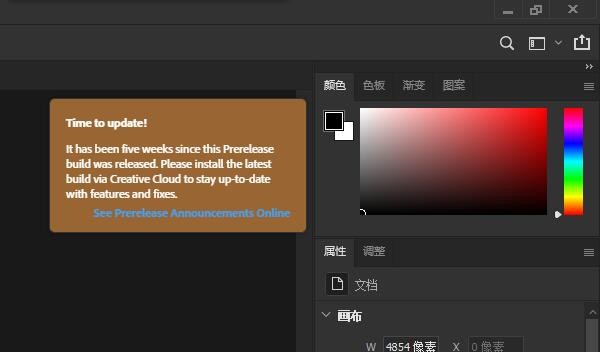
方法如下:
三指头触控板向上滑动 调出所有窗口,这个过程你可以多切换几个别的应用 比如浏览器,微信什么的,直到你的窗口总览能够看到 ps beta应用和 time to update的提示框分别处于两个不同窗口。
然后鼠标移到 time to update 这个黄色窗口,三指触控版向下划,回到ps这个界面
此时你目前选中的窗口是 time to update这个黄色窗口,按下快捷键command W 就可以关闭这个烦人的更新窗口

提示:此方法不要新建画布,要让ps停留在没有任何画布文件打开的情况下,才能够关闭更新提示,否则当你按command W的时候,会识别成关闭你已经新建画布的psd文件。
(我关闭后又弹过一次,再关闭后此次打开ps就再也没有弹出这个更新窗口了)
唯一缺点就是 每次进ps可能都要关闭一下这个黄色窗口,不过好在终于不会因为这个窗口遮挡菜单视线了。
Friends of the Mac version see here!!
After a long day of tossing, I finally found a solution
Here's how:
The three-finger trackpad slides up to bring up all the windows, and you can switch between several other apps such as browsers, WeChat or something, until your window overview can see that the PS beta app and the prompt box of Time to Update are in two different windows.
Then move the mouse to the yellow window of Time to Update, and swipe down the three-finger touch version to return to the PS interface
At this point, the window you currently select is the yellow window Time to Update, and pressing the shortcut command W can close this annoying update window
[Cool] tip: This method does not create a new canvas, let the ps stay in the absence of any canvas file open, to be able to close the update prompt, otherwise when you press command W, it will be recognized as closing the psd file you have created a new canvas. [Cool]
(I closed it and played it again, and after closing it again, I opened PS this time and never popped up again)
The only downside is that you may have to close this yellow window every time you enter PS, but fortunately it will not obscure the view of the menu because of this window.